Subscribe to our social channels to get the latest news about Hungary!


PDF, whose full name is Portable Document Format, claiming the meaning that it can be a lightweight file format, having the ability to carry content in different types, including images, text, tables, etc. With such great attribution, PDF is widely used in different aspects of our daily life today.
PDF is developed by Adobe, and the company also published software like Acrobat and Adobe Reader to open PDF and edit the PDF files with the most advanced features. However, we all know that Adobe software is expensive. When we need to edit, manage, or convert our PDF files, is there any better ways to do it? Today, I’d like to introduce the best online PDF solutions provided voted by thousands of users in 2020, which is EasePDF.
Overview of the Best PDF Tools Provider – EasePDF
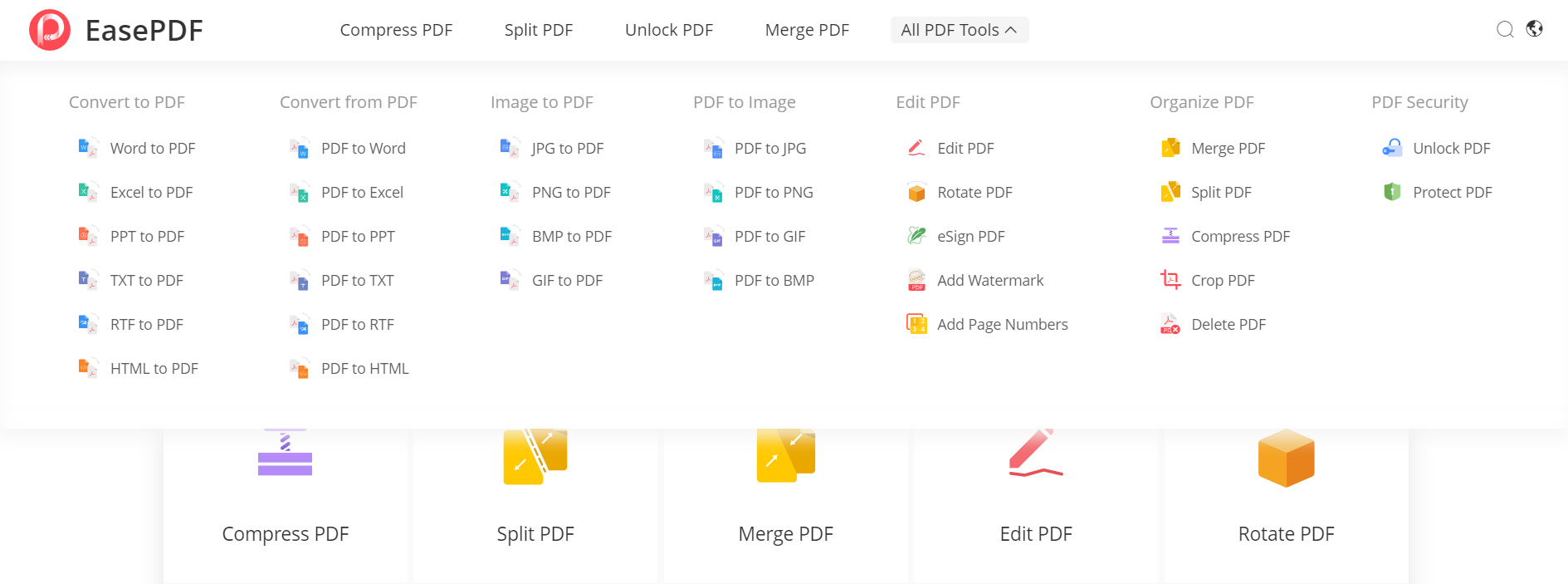
EasePDF is not a software, but an online platform, which means that users don’t need to download any application on the computer for using the built-in services. Instead, just use a web browser and go to the official website of EasePDF, you can use all the PDF tools provided there for editing, managing, or converting your PDF files. Overall, there are up to 32 PDF tools provided on EasePDF now, and according to their functions, these tools are mainly divided into 5 types.
Type 1. PDF to Other Formats Converters
By converting PDF files to other formats such as Word, Excel, PPT, image, etc, you can change the uneditable PDF files to be editable again.
Type 2. Other Formats to PDF Converters
By contrast, another type of PDF converters provided by EasePDF can help convert various common document formats, including Word, Excel, PPT, and even images to PDF. In this way, the file content can be presented with the best visual effect through PDF.
Type 3. PDF Editors
Now let’s come to the editors. EasePDF releases some PDF tools such as Edit PDF, Rotate PDF, eSign PDF, Add Watermark and Add Page Numbers for you to make your PDF files more personalized.
Type 4. PDF Organizers
Want to make some changes to the layout of the PDF files? Don’t miss these PDF organizers provided by EasePDF! You can merge or split PDF, compress, crop, or delete pages to make a satisfying PDF file!
Type 5. PDF Protectors
Last but not least, these two PDF tools, Unlock PDF and Protect PDF, are invented to help keep your PDF safe! By removing and adding the passwords of the PDF files, you can secure the PDF files by changing the passwords regularly!